 Reelity Check
How many reels do I watch a day? How to find out
Updated 20 November 2026
Your phone can tell you how many minutes went into Instagram or YouTube. It can't tell you how many reels. Here is what each tool shows, and how to get the real number.
What your phone already shows
- Android: Settings → Digital Wellbeing shows your screen time today and the minutes spent in each app.
- Instagram: profile → menu → Time management shows how much time you've spent on Instagram (Instagram Help Centre).
What minutes hide
Thirty minutes could be a handful of long videos or well over a hundred quick ones. The number of reels says more about the swipe habit than the minutes do, and it's the number you notice going up while you scroll.
Count one session by hand
- Next time you open Reels or Shorts, count each video you swipe past for five minutes.
- Divide by five to get your reels per minute.
- Multiply by the minutes Digital Wellbeing shows for that app today.
It's rough, because some reels hold you longer than others, but it gives you a first number.
Pick a limit from your own number
There's no official healthy number of reels. A practical start: watch your count for a week without changing anything, then set a daily limit a bit under your average and lower it slowly.
Where Reelity Check fits
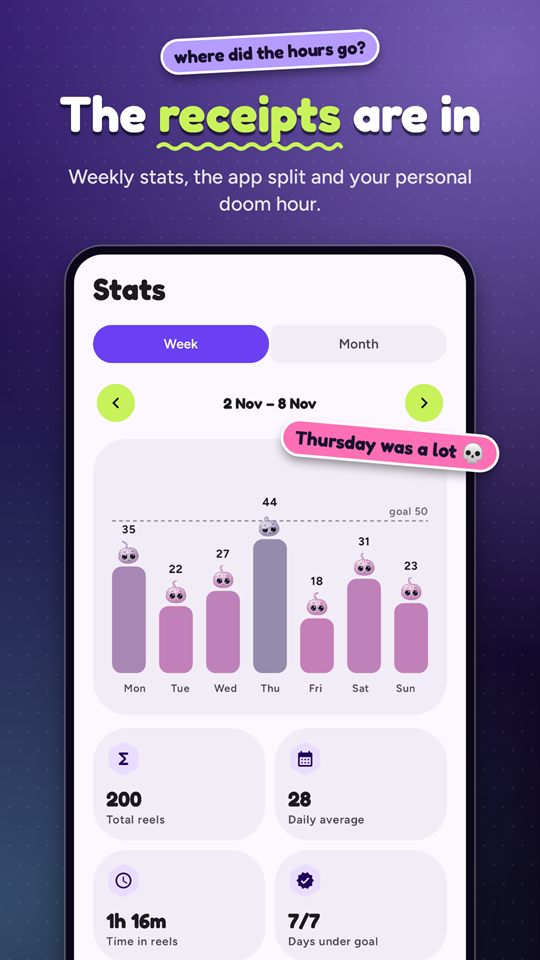
Reelity Check counts every reel and Short for you, live, per app and per hour, and shows the total on top of the feed while you scroll. Stats show your daily, weekly and monthly counts and your "doom hour", the hour you scroll most, and every Sunday Doomscrolling Wrapped sums up your week. The counts stay on your phone.
Get Reelity Check on Google Play
We make Reelity Check, so weigh our view accordingly. The built-in tools above are free and already on your phone: try them too.
More guides
- How to stop doomscrolling Instagram Reels on AndroidInstagram's own daily limit, Android app timers, Focus mode, and a counter that pauses Reels at your limit.
- How to limit or block YouTube Shorts on AndroidYouTube's Shorts feed limit, Android app timers, and pausing only Shorts while long videos keep playing.
- What to look for in a reel blocker for AndroidSix questions to ask before you give a reel blocker the Accessibility permission.